
Skip to content

Website Help Center · Social Media

How to Add an X (Twitter) Feed to Your Website

You can add an X feed to your Site Before Night website so visitors can see recent posts from your account without leaving the page. The process starts by adding the Twitter section in your website editor and then connecting it with your account username.

Good to know: Even though Twitter is now called X, the website editor may still label this section Twitter. That is the option you will use for the X feed.

Start where you want the feed to appear

Choose the location

Open the page in your website editor and scroll to the part of the page where you want the X feed to appear.

Add a new section

Select + Add New Section. The editor will open the available section choices.
Xfeed s1 ss1

Choose Twitter and connect your feed

  1. Choose the Twitter section

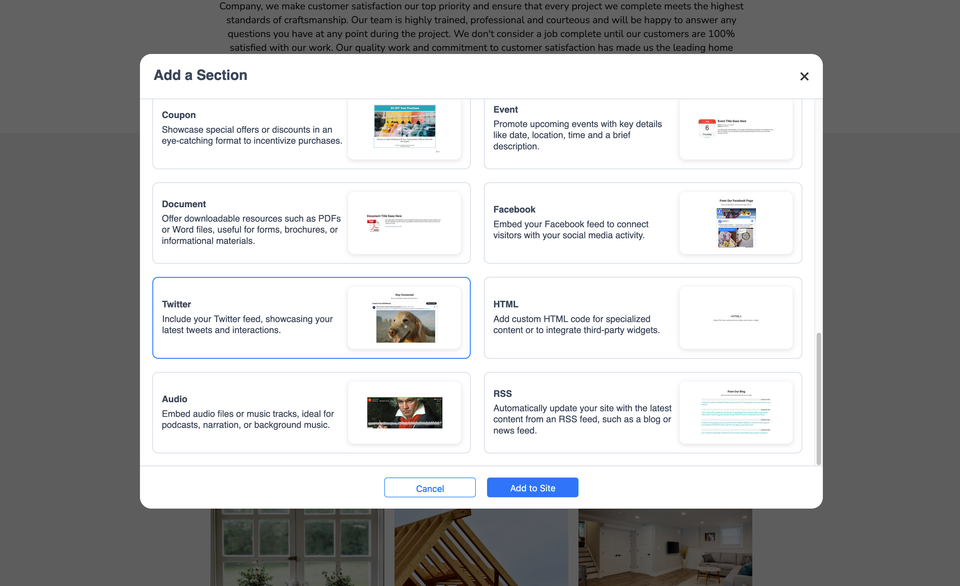
    Find and select the Twitter option in the Add a Section window.

  2. Add it to the page

    With Twitter selected, choose Add to Site. The new feed section will be added at the location you selected.

  3. Enter your X or Twitter username

    Edit the newly added section and paste your Twitter/X username into the field provided. Follow the username format requested by the editor.

Before you finish

Check that the feed is showing the account you intended. If the wrong account appears, return to the section settings and verify the username you entered.

Common questions

Why does the editor say Twitter instead of X?

The section shown in the website editor is labeled Twitter. Use that option when you want to add an X/Twitter feed.

Where can I place the feed?

Scroll to the part of the page where you want the feed before selecting + Add New Section.

What information do I need?

Have the username for the X/Twitter account you want to display ready to paste into the field provided by the editor.

Need another website editing guide?

Browse the Site Before Night Website Help Center for more customer-friendly tutorials, or contact us if the editor is not behaving as expected.