Skip to content
Website Help Center

How to Edit Text on Your Website

Your Site Before Night website is prepared for you, but you can continue personalizing ordinary website text whenever your business information, services, offers, or wording changes.

In short: find the section containing the text you want to change, open its Edit controls, then use the Content tab to update the wording.

Open the section you want to edit

1

Find the section

While you are in your website editor, locate the section that contains the heading, paragraph, description, or other text you want to update.

2

Choose Edit

Hover over that section and select the Edit option when the section controls appear.
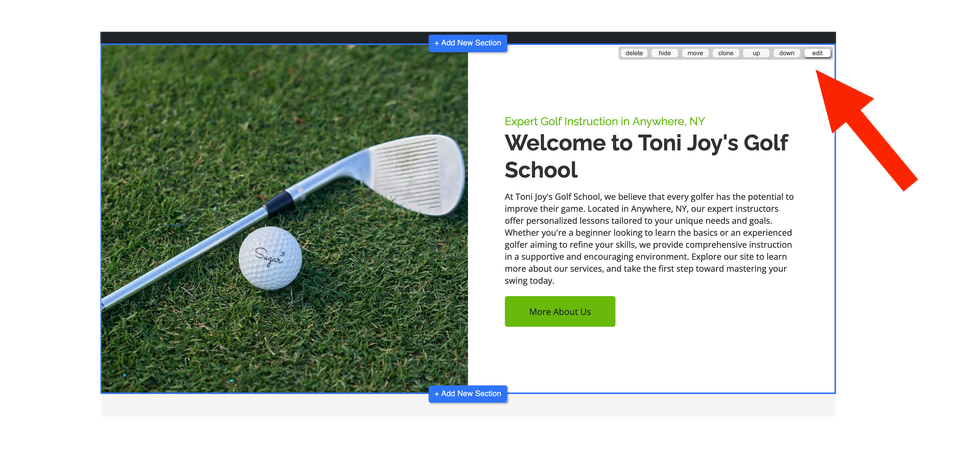
H 005 s1 ss1

Change your wording in the Content tab

After opening the section editor, use the Content tab for changes to the section's main content.

3. Open Content and update the text you need

Select the Content tab and use the available content fields for that section to update the wording you want to change.

This is where you can make ordinary text updates such as correcting wording, refreshing a heading or description, or updating business information that appears as text in the section.

Keep the change focused. If you only need to change what the page says, you generally do not need to change the section's visual styling at the same time.
H 005 s2 ss1

Save and check your change

4. Save your changes

When you are satisfied with the updated wording, select Save so the changes are retained.

Be careful with the Delete control. Delete is for removing an entire website section, not simply removing a sentence or changing its wording. If you only want to revise text, stay within the section's editing controls.

Before you finish

  • Read the updated text once for spelling and accuracy.
  • Confirm phone numbers, hours, prices, dates, or other details you changed.
  • Keep headings clear and easy for customers to understand quickly.
  • Make sure your new wording still fits naturally with the surrounding section.

Need more website help?

Continue with other owner-friendly tutorials, explore practical ideas for improving your site, or use the technical help section if something in the editor is not working as expected.

H 005 s3 ss1