Skip to content
Website Pages

How to Hide a Page From Your Website Menu

You can remove a page from your website's visible navigation without deleting the page itself. This is useful when you want to keep a page available but do not want visitors choosing it from your main menu.

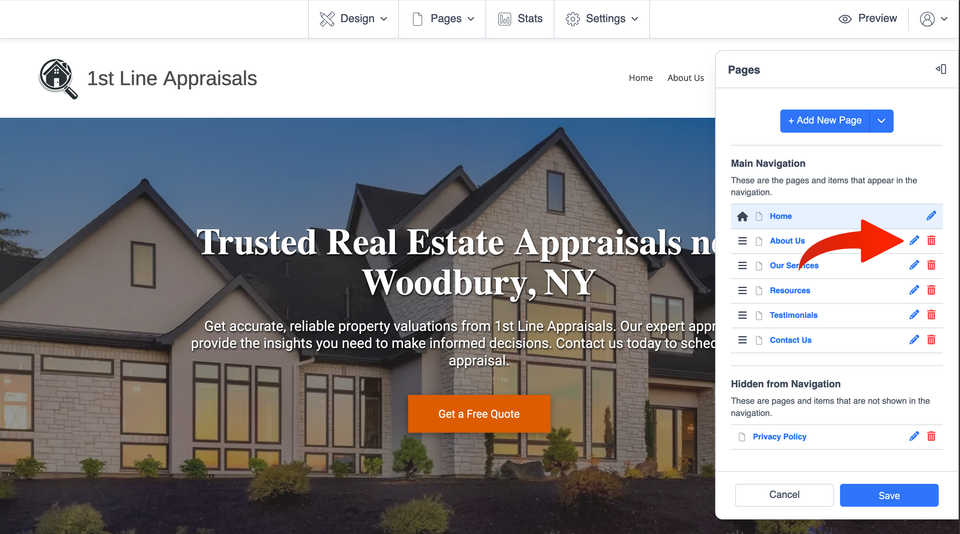
Start in your website editor and open Pages, then select Manage Pages. This opens the area where you can manage which pages appear in your navigation.

Hide or delete? Hiding is the better choice when you may still need the page or want to link people directly to it. Deleting a page removes it entirely and is a separate action.

H 018 s1 ss1

Choose the Page You Want to Hide

In the page list, find the page you want to remove from the website menu. Select the pencil icon beside that page to open its settings.

Tip: Hiding a page is different from using the trash icon. If your goal is only to remove the page from navigation, open the page settings instead of deleting it.
H 018 s2 ss1

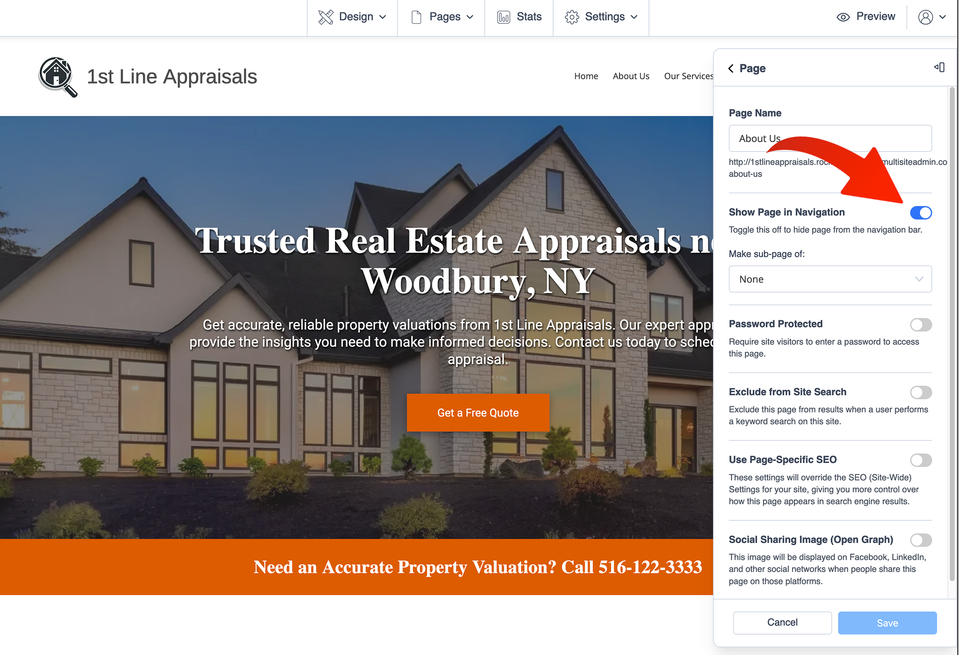
Turn Off “Show Page in Navigation”

Inside the page settings, locate Show Page in Navigation. Turn this setting off to remove the page from your website's navigation menu.

You are changing the page's menu visibility, not deleting the page. That makes this useful for pages you want to keep available for direct links, campaigns, special offers, or other situations where the page does not need to appear in your main navigation.

H 018 s3 ss1

Save Your Change

Select Save after turning off the navigation setting. Then preview your website and confirm that the page no longer appears in the menu.

If you want the page back in the menu later, return to the same page setting, turn Show Page in Navigation back on, and save again.

What to Know About Hidden Pages

Hiding Is Not Deleting

Removing a page from navigation lets you keep the page instead of permanently removing it. This can be useful for pages intended for a specific link or audience.

Menu Visibility Is Different From Search Visibility

Hiding a page from your website menu should not be treated as a way to control whether search engines can find the page. Those are separate settings and considerations.

Want to hide the Home page too? The website editor may require the other pages to be hidden from navigation before the Home page can be hidden. This is mainly useful when configuring a website so that its normal navigation is no longer displayed.