Skip to content
Website Help Center

How to Hide a Website Page From Search Engines

Sometimes you may want to keep a particular page on your website without having it appear in search-engine results. Your website editor includes a page setting that lets you control this for individual pages.

Quick answer: Open Pages, choose Manage Pages, edit the page you want to change, turn Hide from Search Engines on, and save the page settings.

Open Manage Pages

In your website editor, hover over the Pages tab and select Manage Pages. This opens the area where you can manage the individual pages on your website.
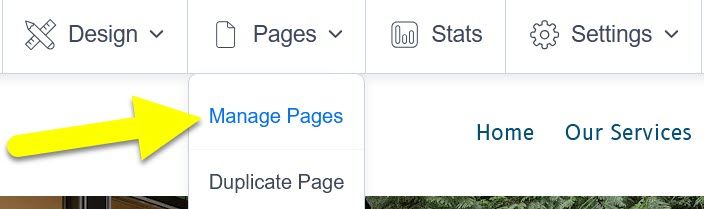
Hidesearch s1 ss1

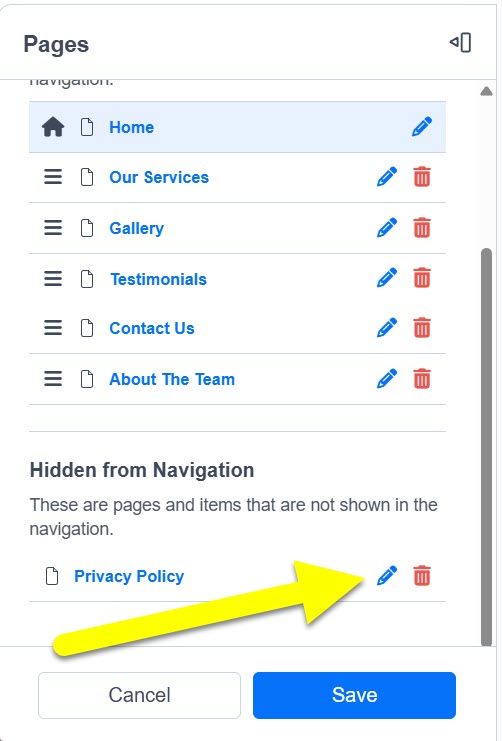
Open the settings for the page

Find the page you want to hide from search engines. Select the Pencil icon beside that page to open its settings.

Before changing the setting: make sure you have selected the correct page, especially if your website contains pages with similar names.
Hidesearch s2 ss1

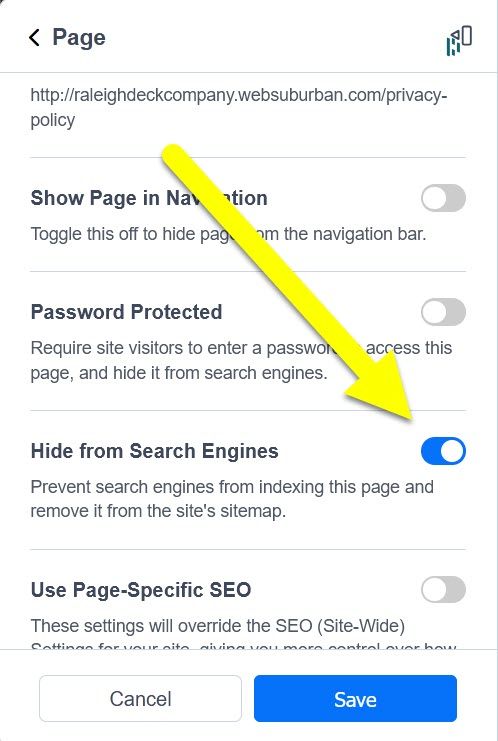
Turn on Hide from Search Engines

In the page settings, find Hide from Search Engines and turn the setting On. Then select Save to keep the change.

Important: hiding a page from search engines is different from hiding that page from your website menu. This setting controls search visibility for the page; it does not serve as a password or access restriction.
Hidesearch s3 ss1

Know what you are hiding

This setting is useful when you want a page to remain part of your website without being intended for search-engine discovery.

Search visibility

Use Hide from Search Engines when the issue is whether a particular page should be available to search engines.

Private or restricted information

Do not treat search-engine visibility as a security feature. If information truly needs restricted access, simply hiding the page from search engines is not an appropriate substitute for access protection.

Keep learning about your website

Browse more step-by-step editing help, learn the basics of how search engines interact with your website, or visit technical help if an editor setting is not appearing as expected.