Skip to content

Website Leads & Statistics

How to View Website Form Submissions

When someone completes a contact or inquiry form on your Site Before Night website, you can review that submission from your website editor. This gives you another way to find customer inquiries even if you missed the original notification email.

Where do form submissions normally go?

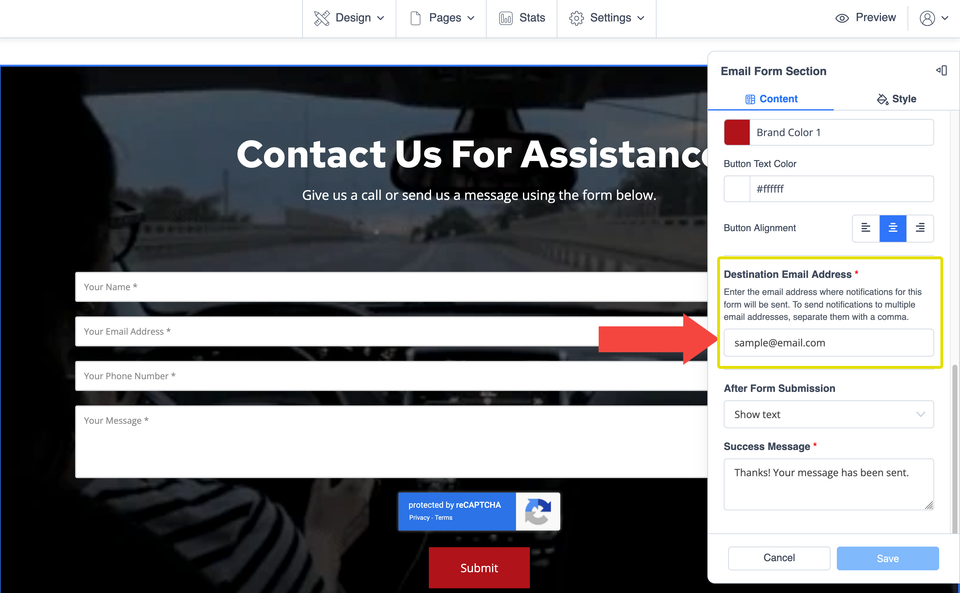
Each email form has a Destination Email Address that determines where new submissions are sent. Your website editor also keeps a list of submitted forms, including messages that may have been identified as spam.

Ls 001 s1 ss1

Open your Form Submissions

After signing in to your website editor, the saved submissions are available from the website settings.

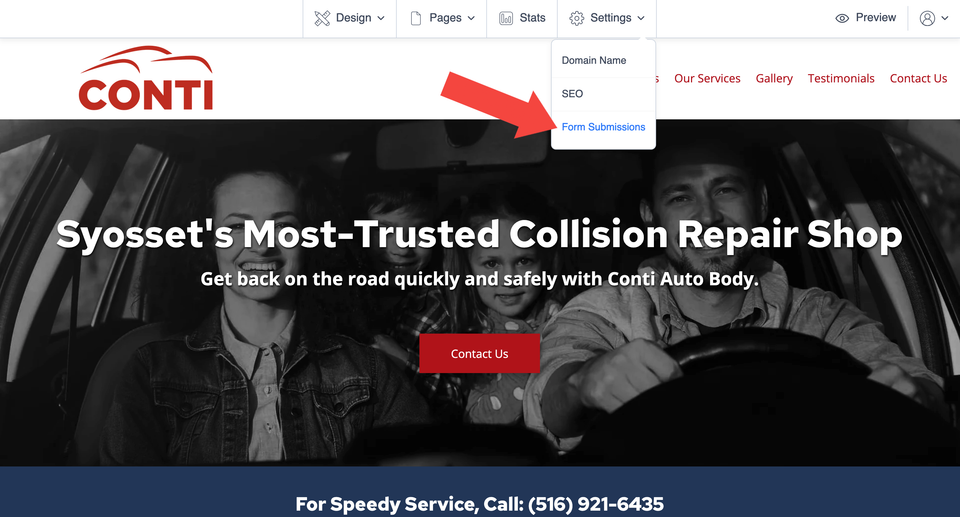
  1. Open Settings in your website editor.
  2. Select Form Submissions.
  3. Your website's saved form submissions will appear on the next screen.
Ls 001 s2 ss2

Understand the submissions list

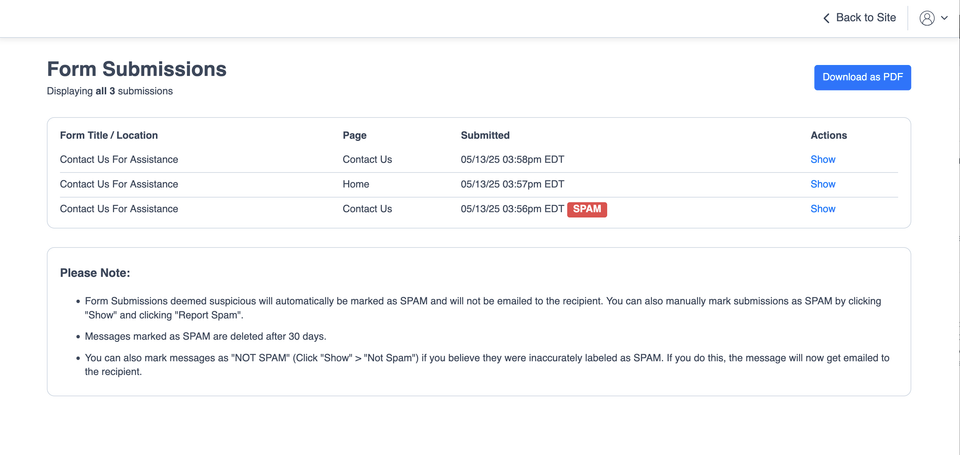
The Form Submissions screen gives you an overview of the inquiries submitted through your website and several ways to review or manage them.

Form / Location

Identifies the form that received the submission.

Page

Shows which website page contained the form.

Submitted

Shows the date and time the inquiry was submitted.

Spam

Indicates whether the system identified the submission as suspicious.

Download as PDF

Creates a PDF containing the form submissions and their contents for your business records.

Show

Opens the individual entry so you can read the complete submission.

Privacy tip: Form submissions can contain names, email addresses, phone numbers, and other customer information. Store downloaded copies securely and only share them when there is a legitimate business reason.
Ls 001 s3 ss3

Open an individual website inquiry

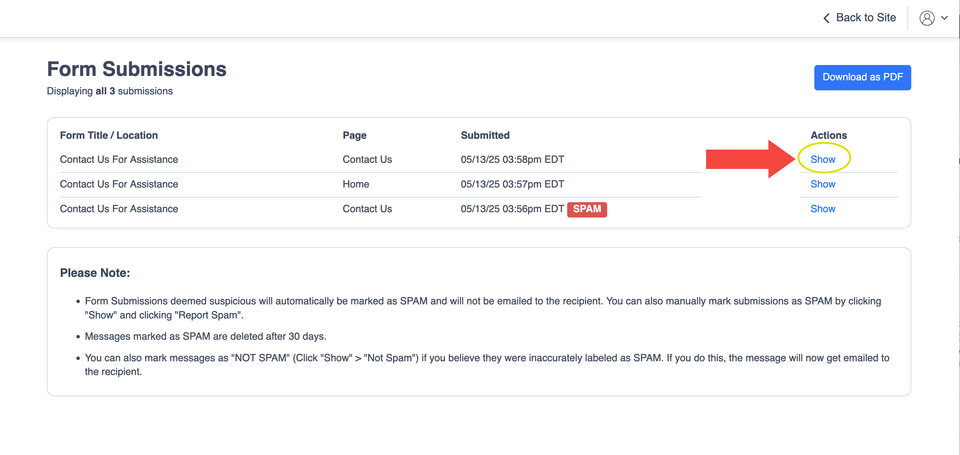
Find the submission you want to review and select Show. This opens the individual record so you can see the information the visitor submitted through that particular form.

If you are looking for a specific inquiry, the submission date, page, and form location can help you identify the correct entry before you open it.

Useful when an email seems to be missing: check the Form Submissions screen before assuming the visitor's message was lost. The saved entry may still be available here.
Ls 001 s4 ss4

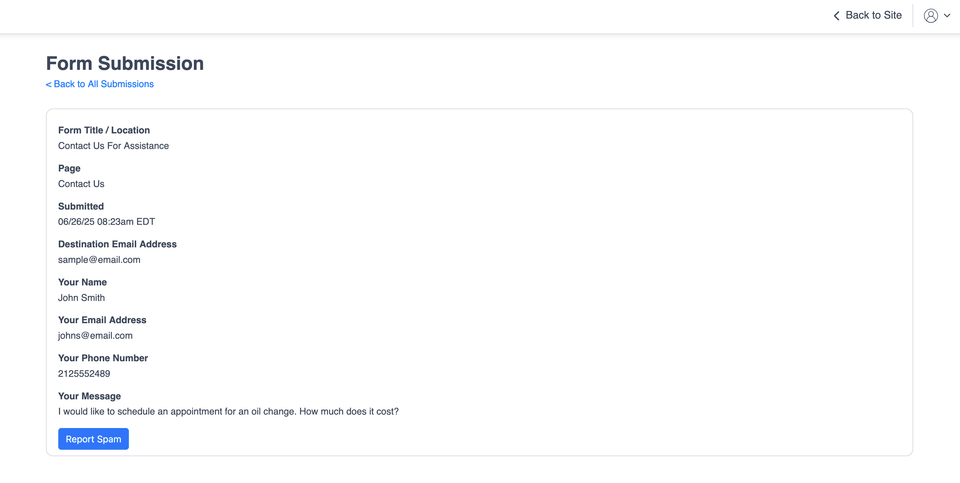
Review the full message and manage spam

The individual submission view lets you review the message and sender details captured by the form. This is also where you can correct the spam status when necessary.

How spam controls work

  • Use Report Spam when a submission is clearly unwanted or suspicious.
  • Submissions marked as spam are not emailed to the form's recipient.
  • Messages classified as spam are deleted after 30 days.
  • If a legitimate inquiry was classified incorrectly, choose Not Spam.
  • When a submission is changed to Not Spam, it is then emailed to the recipient listed as the form's Destination Email Address.
Ls 001 s5 ss5

If you are not receiving a form submission by email

The Form Submissions screen is a useful first place to check when someone says they contacted you through your website but you cannot find the email.

  • Look for the inquiry in Settings → Form Submissions.
  • Check whether the submission was marked as spam.
  • If a legitimate inquiry is marked as spam, open it and choose Not Spam.
  • If the submission exists in the editor but you are still not receiving the notification email, the email destination or delivery may need to be checked.

If you need help with an email-delivery problem or you are unsure whether your form is configured correctly, use Site Before Night's technical-help resources rather than changing unfamiliar platform settings.

Common questions about website form submissions

Can I see a submission if I never received the email?

Yes. Check Settings → Form Submissions in your website editor. The submissions list can also contain messages that were classified as spam and therefore were not emailed to the form recipient.

Can I download my form submissions?

Yes. The Form Submissions screen includes a Download as PDF option that creates a document containing the submissions and their contents.

What happens to submissions marked as spam?

Spam submissions are not emailed to the form recipient and are deleted after 30 days. If a legitimate inquiry was incorrectly classified, open it and use Not Spam.