
Skip to content

Website Image Guide

Website Image Size and File Guidelines

Using the right image size helps your website photos stay sharp without creating unnecessarily large uploads. Your Site Before Night website supports several common image formats, and knowing a few basic size guidelines can make replacing photos, logos, backgrounds and slideshow images much easier.

Image file types you can use

Your website supports the following image formats:

JPG / JPEG
PNG
GIF
AVIF
BMP
HEIC
TIFF
WebP
Maximum upload size: 10 MB per image. If an image file is larger than 10 MB, reduce its file size before attempting to upload it. The website can automatically reduce uploaded images for faster page loading, but the original upload must still be within the 10 MB limit.

Before uploading a new image

  • Make sure the file is no larger than 10 MB.
  • Start with an image large enough for the space where it will appear.
  • Avoid stretching a small image to fill a large background area.
  • Keep images in consistent proportions when they will appear together in a slideshow.
  • Preview important image changes on both desktop and mobile layouts.

What about your logo?

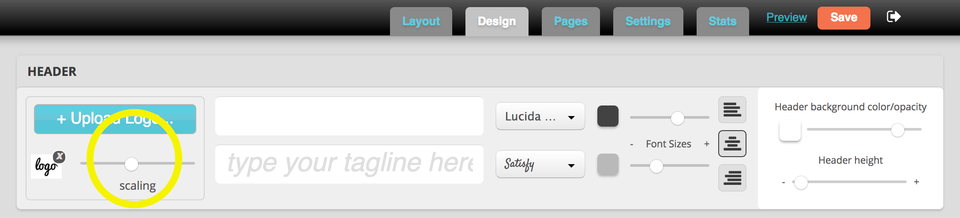
When a logo is used in your website header, its displayed size can be adjusted with the editor's built-in scaling capability. Start with a clean, good-quality logo file so it remains crisp when displayed at the size your header needs.
Kb16 s1 ss1

Recommended size for website background images

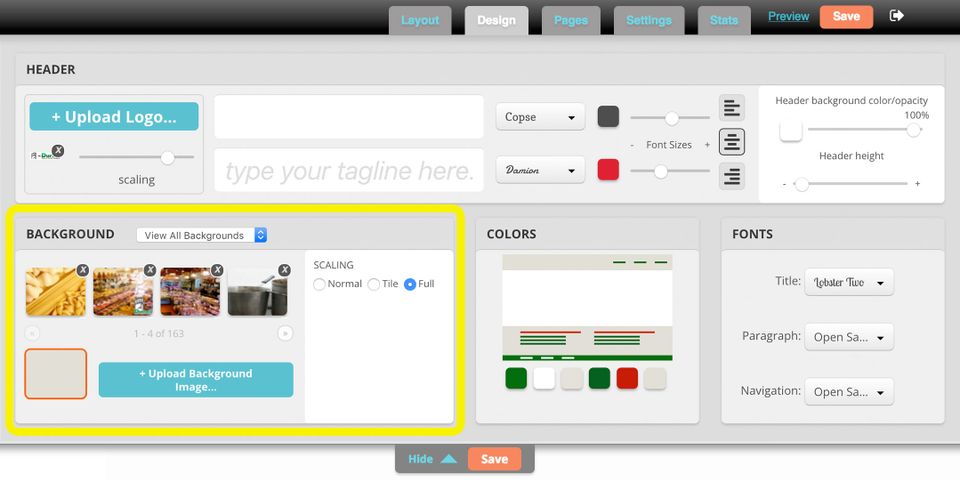
Background images usually cover a much larger area than ordinary photos, so they need enough resolution to remain clear when stretched across a desktop screen.

About 1500 × 1000 px

This is the recommended starting size for site background images. Background images are displayed at a maximum width of 1,920 pixels. Images uploaded larger than that may be resized down automatically.

Avoid images that are too small

If a small image has to expand to fill a large background area, it can look blurry or pixelated. This is especially noticeable when the background is configured to fill the available space.

Hero and row backgrounds

The same general guideline applies to hero images and row backgrounds: an image around 1,500 pixels wide by 1,000 pixels tall is a useful starting point, with a maximum displayed width of 1,920 pixels.

Practical tip: Leave some breathing room around the main subject of a background photo. Wide desktop screens and narrow phone screens may show different portions of the same background image.

Kb16 s2 img1

Image guidelines by website feature

Not every image on your website needs identical dimensions. The best size depends on how and where the image will be displayed.

Individual images

Images can be uploaded up to 10 MB. They retain the proportions of the original image while being reduced as needed for faster website loading.

Photo galleries

Gallery images can also be uploaded up to 10 MB. They appear smaller in the gallery and can display at a larger size when a visitor opens an individual image.

Slideshows

Slideshow images may use different dimensions, but if you want every slide to fill the same area consistently, prepare all of the images using the same 11:5 proportion. In simple terms, the width should be about 2.2 times the height.

  • Standard slideshow: 960 × 435 px
  • Full-width slideshow: 1870 × 850 px

Hero and row backgrounds

Aim for approximately 1500 × 1000 px. Backgrounds display at a maximum width of 1,920 pixels. Images that are too small can appear pixelated when expanded.

Menu images

Menu images can be uploaded up to 10 MB. The image retains its original proportions while being reduced as needed for faster display.

A simple image-prep checklist

  • Keep every upload at or below 10 MB.
  • Use larger source images for full-width backgrounds and hero areas.
  • Do not enlarge a tiny photo and expect it to remain sharp.
  • Crop slideshow images to the same proportions when you want a uniform presentation.
  • Preview the finished page after replacing an important image.

Website image questions

What happens if my image is larger than 10 MB?

Reduce the image's file size before uploading it. The website upload limit is 10 MB per image.

Why does a background photo look blurry?

One common cause is starting with an image that is too small and then expanding it across a much larger area. Use a larger original image for full-width backgrounds.

Do all of my website images need to be the same size?

No. Different website features can use different proportions. Matching dimensions are especially helpful when you want slideshow images to fill the same space consistently.

Can I use an animated GIF?

Yes. GIF files are supported, including animated GIFs.

Need more help with your website?

Browse our customer resources for ordinary website updates, practical improvement ideas, and help with technical website issues.